Register Networks
A RegisterNet joins an undirected graph with one Register per vertex.
Construct a Network
Give RegisterNet a SimpleGraph and one register for each vertex:
using QuantumSavory, Graphsgraph = path_graph(3)net = RegisterNet(graph, [Register(2) for _ in 1:3])If you omit the graph, RegisterNet makes a chain:
net = RegisterNet([Register(2), Register(2), Register(2)])Use the Supported Graph Interface
RegisterNet supports a small part of the Graphs.jl API directly:
| Operation | Result |
|---|---|
vertices(net) | Vertex identifiers |
edges(net) | Undirected graph edges |
neighbors(net, i) | Vertices adjacent to i |
nv(net) | Number of vertices |
ne(net) | Number of edges |
adjacency_matrix(net) | Graph adjacency matrix |
For example:
collect(vertices(net))collect(edges(net))neighbors(net, 2)A RegisterNet is not a subtype of Graphs.AbstractGraph. Do not assume that other Graphs.jl functions accept it. Keep the graph used for construction when you need the full Graphs.jl API. Treat the topology as fixed after construction.
Index Registers and Slots
One index selects a register. A second index selects a slot and returns a RegRef:
node = net[2] # a Registerslot = net[2][1] # a RegRefslot == net[2, 1] # compact formColon indexing selects the same layer from all nodes:
| Expression | Result |
|---|---|
net[:] | All registers |
net[:, j] | Slot j from every register |
Every register must have slot j for net[:, j] to succeed. After you have a RegRef, use the operations in the Register Interface API.
Configure Names and Labels
Use name for the network display name. Use names for register display names:
net = RegisterNet([Register(2) for _ in 1:3]; name="line", names=["left", "middle", "right"])These names appear in register and protocol displays. They do not change the integer vertex identifiers.
Other static metadata uses the following indexing scheme:
net[1, :description] = "end node"net[(1, 2), :length] = 20.0 # undirected edgenet[1 => 2, :loss] = 0.1 # directed edgeFor undirected metadata, (1, 2) and (2, 1) select the same entry. For directed metadata, 1 => 2 and 2 => 1 select separate entries. A metadata read requires the key to exist.
For more sophisticated treatment of metadata, especially if it is used by protocols being simulated in the network, consult the tagging and querying infrastructure.
Configure Link Delays
The classical_delay and quantum_delay keywords set the direct-link delays. A number applies to both directions of every edge:
net = RegisterNet(path_graph(3), [Register(2) for _ in 1:3]; classical_delay=0.2, quantum_delay=0.1)A two-argument callable sets a delay for each direction:
delay(src, dst) = src < dst ? 0.1 : 0.2net = RegisterNet(path_graph(3), [Register(2) for _ in 1:3]; classical_delay=delay)The constructor calls delay(src, dst) and delay(dst, src) separately for each graph edge. The delay advances simulation time. It does not wait in wall clock time.
Classical channels can forward a message across more than one edge. Each hop uses its configured delay. Quantum channels are direct-edge channels. Read Classical Messaging and Buffers for channel and message-buffer use.
Choose a Delivery Model
The graph describes which nodes are directly connected. It does not select a delivery model. A protocol can use the same path topology in two different ways.
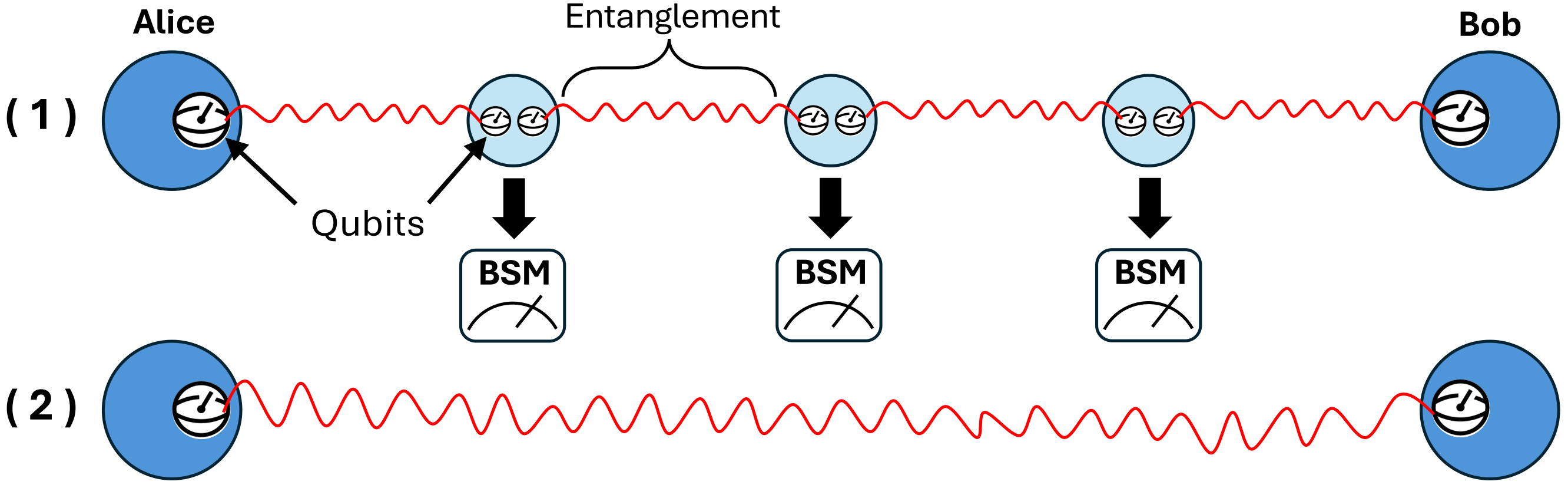
In a two-way model, neighboring nodes first establish short Bell pairs. The intermediate nodes then perform entanglement swaps to create an end-to-end pair. EntanglerProt and SwapperProt provide reusable parts of this control flow; the simulation must configure and start them. The first-generation repeater how-to shows a complete example.
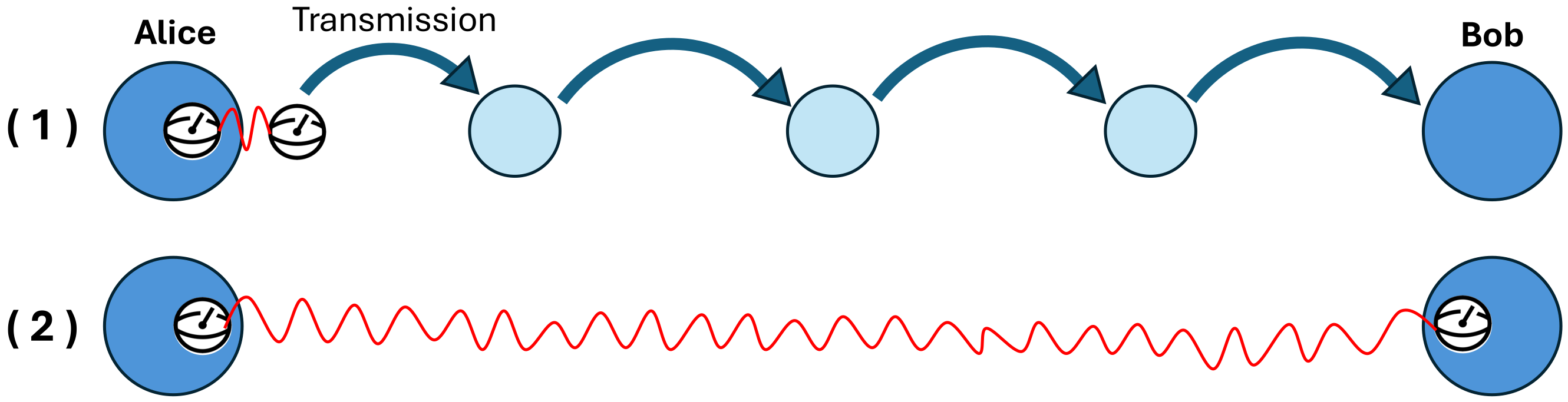
In a one-way model, an input state moves along the path one edge at a time. Each qchannel is a direct-edge channel: it moves a state between two adjacent registers with put! and take!. It does not route the state across several edges. A user protocol must receive the state at each intermediate node and send it over the next direct channel. The Getting Started Manual demonstrates one direct quantum-channel handoff.
Use the ProtocolZoo API to look up the reusable entanglement protocols. Use Classical Messaging and Buffers for the separate rules that govern direct and forwarded classical messages.
Where to Go Next
- Read Architecture and Mental Model for the role of a register network in the package.
- Read Register Interface API for operations on slots.
- Read Classical Messaging and Buffers for network transport.
- Read Visualizations to inspect a register network.